Howdy, Stranger!
It looks like you're new here. If you want to get involved, click one of these buttons!
Quick Links
Hide "editor options" box in klayout

Dear Supporter, 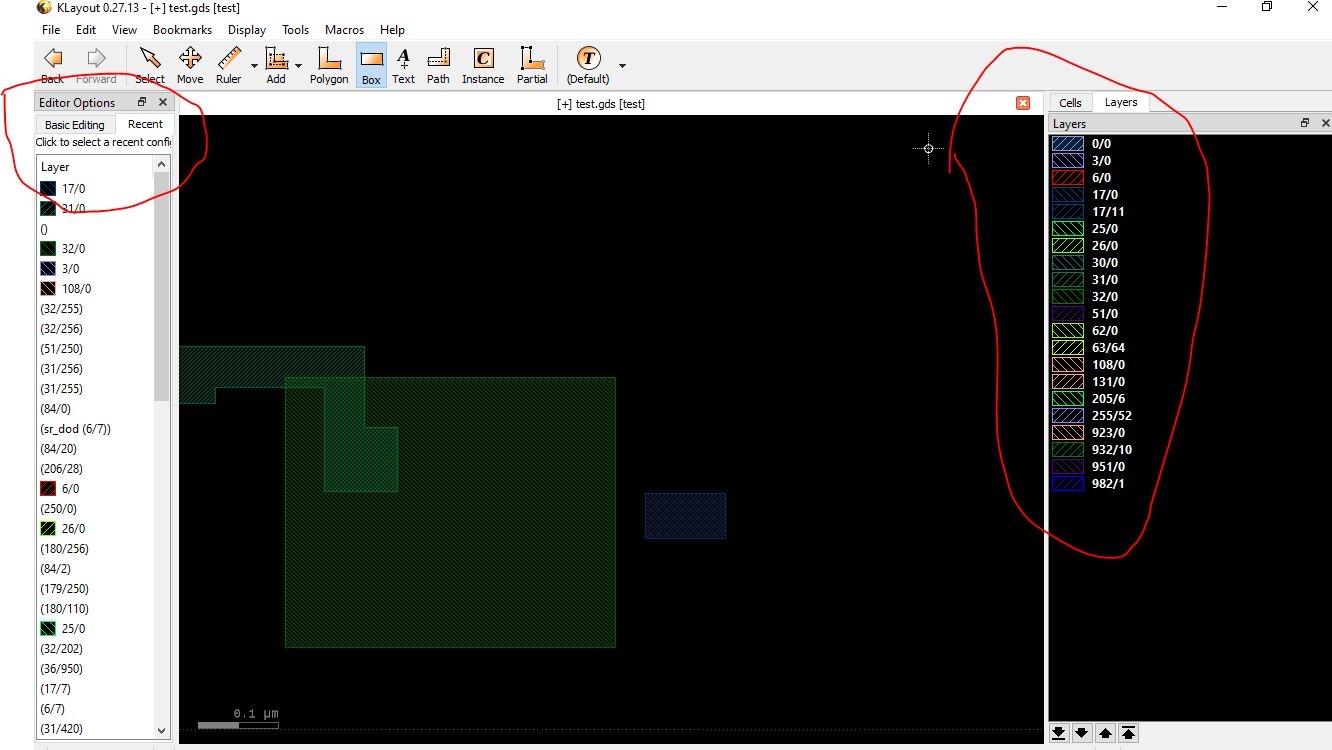
How can I hide the "Editor option" Box in KLayout when I already have it and use the "layer tab" on the right to select a layer to create a new polygon or erase it?
Although I've tried collapsing it and pinning it to the left whenever I select Add => Box or Erase => Box, I still find it cumbersome and unnecessary.
Comments
You will find it more cumbersome if you don't have it - because then you cannot enter the width of a path, the text string of a label or the parameters of a PCell or quickly access the snapping modes. It makes sense to have it.
Why don't you just pin it below the Cell/Layer panel with minimum height? I don't think it is a problem if it sits there.
Matthias
@Matthias thanks, By the way, I want to pin Maker Database Browser as a tab in the top right corner of the screen, in the same group as the cell and layer, and hide the Maker Database Browser box to avoid clutter. Is that possible? Using Python code would also be a good idea.
If it would be perfect,
If you release a patch, you could add the option to add the drc browser tab to the right-click options.
Because I found that there isn't much setup required for the Maker Database Browser box, and it doesn't need to zoom in like the LVS Browser, since the DRC errors are already shown on the drawing screen.
I would like to see (or be led to) more info
on menu modifications for aspiring "power
users". Something tutorial-like that wasn't
a video, maybe?